Powerful visual editor for Knex.js
Edit and export Knex.js definitions just in a few clicks.
Speed up your work and avoid routine.
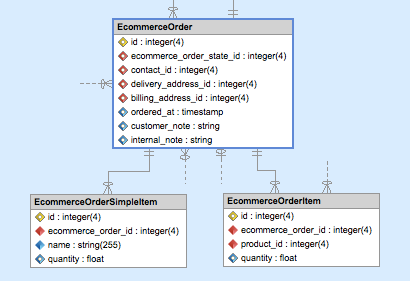


1. Visually edit your project model.
import { Knex } from "knex";

export async function up(knex: Knex): Promise<void> {
    return knex.schema
        .createTable('Address', function (table) {
            table.increments('id').notNullable().unsigned();
        })
        .createTable('EcommerceOrder', function (table) {
            table.increments('id').notNullable();
            table.timestamp('ordered_at');
            table.string('customer_note');
            table.string('internal_note');
            table.integer('billing_address_id').unique();
            table.integer('delivery_address_id').unique();
        })
        .alterTable('EcommerceOrder', function (table) {
            table.foreign('billing_address_id').references('id').inTable('Address');
        })
        .alterTable('EcommerceOrder', function (table) {
            table.foreign('delivery_address_id').references('id').inTable('Address');
        })
    ;
}
export async function down(knex: Knex): Promise<void> {
    return knex.schema
        .alterTable('EcommerceOrder', function (table) {
            table.dropForeign(['delivery_address_id']);
        })
        .alterTable('EcommerceOrder', function (table) {
            table.dropForeign(['billing_address_id']);
        })
        .dropTable('EcommerceOrder')
        .dropTable('Address')
    ;
}
//Object for database table
export interface EcommerceOrder
{
id?: number;
ordered_at?: number;
customer_note?: string;
internal_note?: string;
billing_address_id?: number;
delivery_address_id?: number;
}
//Array of objects for table
export type EcommerceOrderArray = Array<EcommerceOrder>;2. Export it to complete definition files.
Download 14-day trial version
Try Skipper for free No credit card needed.
Why use Skipper
Simple Project import
Sophisticated import wizard allows you to import your existing Knex.js projects from the database in just a few clicks. The created visual model shows you complete project logic simply and quickly.


Definitions exported by one click
You can export your Knex.js project repeatedly and as many times as you need. Exported definitions are in a standardized and ready-to-use format without a need for further editing.


Editing in visual interface
Intuitive wizards and dialogs guide you through editing of all objects. Each change in a model is properly transferred to the definition files in the moment of their export.


Lower need of Knex.js skills
Thanks to Skipper inbuilt value advisors, validators, assistants and definitions created via standardized templates you can stop worrying about Knex.js syntax and keywords.


See all the features
Support for all Knex.js features
Supported formats
Migrations and base objects are continuously updated during every export. Derived model object is one-time exported and prepared for your customization.


Entities and modules
Create entities, change their fields and ORM properties or simply remove them from the model. Use colors to create logical units and make orientation in the model easier.


Associations
With smart wizards you can create all types of Knex.js associations (both classic and polymorphic). Use association tools and define owner and inverse entity or MN entity and aliases.


Indexes
Create indexes and manage them with the help of intuitive Entity Editor. Specify all indexes you need and which fields are indexed by them.

Knex.js Models
Model can be exported as single application to the "app" directory or can be split to several modules as standalone "packages".

Database Migrations
Create, update or configure migrations with one click directly from the Skipper application.


ORM Properties
Alter all model properties as you need. Skipper unique Property Editor provides a quick and easy way to create, edit or delete any value.


Customization
Implement your own customizations to Skipper so it fully fits your needs. Create new behaviors, configure custom properties or datatypes or connect Skipper with external tools.
See all the features
Over 5,000 companies use Skipper every day
“

We have good use of the tool. It simplifies our daily work, saves us time and is simple and intuitive to use.
Thomas Somoen, Try/Apt
”
“

It is faster and gives less errors to have Skipper create the mapping code instead of writing it myself. Later in the development process I often use the Skipper diagram as a quick reference.
Herman Peeren, Yepr
”
Detailed List of supported Knex.js ORM properties
Skipper model properties
| Object | Property |
|---|---|
| Project | name, storage path, migrations path, description |
| Module | name, namespace, description, external plugin storage, export path and format |
| Entity | name, namespace, description |
| Field | name, type, size, required, unique, primary key, auto increment, default value, enum values, description |
| Association | owner/inverse entity, reference fields, owner/inverse alias, association type (one-to-one, one-to-many), classic/polymorphic, parent requirement, description, onDelete, onUpdate |
| Many to Many | mn entity, owner/inverse entity, reference fields, owner/inverse alias, description, pivotAttribute, pivotAccess, withTimestamps |
| Index | name, unique, indexed fields, description |
Knex.js model properties
| Object | Property |
|---|---|
| Project | - |
| Module | migrations enabled/disabled, migrations-path, models enabled/disabled, interfaces enabled/disabled, interfaces-path, interfaces-prefix |
| Entity | engine, charset, collate, inherits, model-disabled |
| Field | collation, comment |
| Association | onDelete, onUpdate |
| Many to Many | pivotAttribute, pivotAccess, withTimestamps |
Knex.js datatypes support
string
text
uuid
json
jsonb
integer
bigInteger
tinyint
smallint
tinyInteger
mediumint
bigint
decimal
double
float
date
dateTime
time
timestamp
timestamps
dropTimestamps
binary
boolean
enum
geometry
geography
point
Knex.js associations support
One to one (one-to-one)
One to many (one-to-many)
Many to one (many-to-one)
Many to many (many-to-many)
Knex.js model import / export formats
Migration definitions
Single / multi module (packages) export support
Model objects base classes
Model objects derived classes
Model interfaces