Powerful visual editor with definitions export
Create your application model and export its definition files just in a few clicks.
Output meets all MVC and ORM frameworks standards.
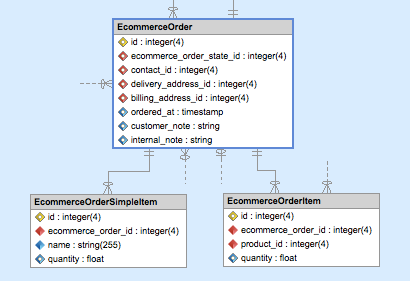


1. Visually edit your project model.
<?php
use Doctrine\ORM\Mapping AS ORM;

/**
 * @ORM\Entity
 * @ORM\Table(schema="ecommerce_order", options={"charset":"utf8","collate":"utf8_unicode_ci"})
 * @ORM\ChangeTrackingPolicy("DEFERRED_IMPLICIT")
 */
class EcommerceOrder
{
    /**
     * @ORM\Id
     * @ORM\Column(type="integer", length=4, options={"unsigned":true})
     * @ORM\GeneratedValue(strategy="SEQUENCE")
     */
    private $id;

    /**
     * @ORM\Column(type="datetime", nullable=true)
     */
    private $ordered_at;

    /**
     * @ORM\Column(type="string", nullable=true)
     */
    private $customer_note;

    /**
     * @ORM\Column(type="string", nullable=true)
     */
    private $internal_note;

    /**
     * @ORM\OneToOne(targetEntity="Address")
     * @ORM\JoinColumn(name="billing_address_id", referencedColumnName="id", unique=true)
     */
    private $BillingAddress;

    /**
     * @ORM\ManyToOne(targetEntity="Address")
     * @ORM\JoinColumn(name="delivery_address_id", referencedColumnName="id")
     */
    private $DeliveryAddress;
}
<?xml version="1.0"?>
<doctrine-mapping
xmlns="http://doctrine-project.org/schemas/orm/doctrine-mapping"
xsi="http://www.w3.org/2001/XMLSchema-instance"
schemaLocation="http://doctrine-project.org/schemas/orm/doctrine-mapping.xsd">
<entity
name="EcommerceOrder"
change-tracking-policy="DEFERRED_IMPLICIT"
schema="ecommerce_order"
repository-class="Doctrine\ORM\EntityRepository">
<id name="id" type="integer" length="4">
<generator strategy="SEQUENCE"/>
<options>
<option name="unsigned" value="true"/>
</options>
</id>
<field name="ordered_at" type="datetime" nullable="true"/>
<field name="customer_note" type="string" nullable="true" version="true"/>
<field name="internal_note" type="string" nullable="true" version="true"/>
<many-to-one field="DeliveryAddress" target-entity="Address">
<join-columns>
<join-column
name="delivery_address_id"
referenced-column-name="id"
on-delete="CASCADE"/>
</join-columns>
</many-to-one>
<one-to-one field="BillingAddress" target-entity="Address">
<join-columns>
<join-column
name="billing_address_id"
referenced-column-name="id"
unique="true"
on-delete="CASCADE"/>
</join-columns>
</one-to-one>
<options>
<option name="charset" value="utf8"/>
<option name="collate" value="utf8_unicode_ci"/>
</options>
</entity>
</doctrine-mapping>EcommerceOrder:
type: entity
changeTrackingPolicy: DEFERRED_IMPLICIT
schema: ecommerce_order
repositoryClass: Doctrine\ORM\EntityRepository
fields:
id:
id: true
type: integer
length: 4
generator:
strategy: SEQUENCE
options:
unsigned: true
ordered_at:
type: datetime
nullable: true
customer_note:
type: string
nullable: true
version: true
internal_note:
type: string
nullable: true
version: true
options:
charset: utf8
collate: utf8_unicode_ci
oneToOne:
BillingAddress:
targetEntity: Address
joinColumns:
billing_address_id:
referencedColumnName: id
unique: true
onDelete: CASCADE
manyToOne:
DeliveryAddress:
targetEntity: Address
joinColumns:
delivery_address_id:
referencedColumnName: id
onDelete: CASCADE2. Export it to complete definition files.
Download 14-day trial version
Try Skipper for free No credit card needed.
How Skipper helps you
Skipper is an advanced visual editor that allows you to define your MVC application model and export definition files for all common ORM frameworks. With Skipper you can create and maintain the entire model of your application visually and then export it with one click.
- Create your model visually with drag & drop
- Export ORM definition files with one click
- Import existing projects from definition files
- Keep model and code always in sync
- Support for all major ORM frameworks

Benefits for MVC frameworks
| MVC Framework | Supported ORM Frameworks |
|---|---|
| Symfony (all versions) | Propel, Doctrine, Doctrine2 |
| Zend Framework (and Zend Fw2) | Propel, Doctrine, Doctrine2 |
| Laravel | Eloquent, Propel, Doctrine, Doctrine2 |
| CakePHP | CakePHP |
| Any other MVC | Propel, Doctrine, Doctrine2 |
Almost all Skipper features are MVC independent and can be used regardless of the MVC framework you use. The only MVC-dependent feature is the project directory structure which is set during project creation.
This means that you can use Skipper with any MVC framework, not just the ones listed above. As long as you use one of the supported ORM frameworks, Skipper will work with your MVC framework.
Supported ORM frameworks
Skipper includes import wizards that allow you to import your existing project from ORM definition files. You can import the complete project including all entities, fields, associations and other ORM-specific elements. The import wizard guides you through the entire process step by step.


Over 5,000 companies use Skipper every day
“

We have good use of the tool. It simplifies our daily work, saves us time and is simple and intuitive to use.
Thomas Somoen, Try/Apt
”
“

It is faster and gives less errors to have Skipper create the mapping code instead of writing it myself. Later in the development process I often use the Skipper diagram as a quick reference.
Herman Peeren, Yepr
”