Keyboard Shortcuts
Skipper has a support for two different types of keyboard shortcuts to ease your work. The first type is general keyboard shortcuts available through combination of keystrokes, the second is ribbon keyboard shortcuts based on command names and groups.
General keyboard shortcuts
Each action in Skipper has its own keyboard shortcut. The shortcut reveals itself if you hold a mouse cursor above the chosen tool in a ribbon menu.
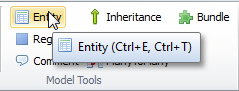
Below you can find a complete list of action shortcuts. In case action have more than one shortcut, these shortcuts are separated by comma.
Visual model shortcuts
| Visual model shortcuts | Shortcut |
|---|---|
| Arrow (selection tool) | CTRL + 1 |
| Move Model | CTRL + 2 |
| Zoom Model | CTRL + 3 |
| Create Entity | CTRL + E or CTRL + T |
| Create Region | CTRL + G |
| Create Comment | CTRL + C |
| Create Inheritance | CTRL + I |
| Create Association | CTRL + A or CTRL + R |
| Create Many-to-Many | CTRL + M |
| Create Module | CTRL + D |
| Zoom Model to actual size (100%) | CTRL + 0 |
| Zoom Model to window | CTRL + * |
| New Project | CTRL + N |
| Open Project | CTRL + O |
| Save Project | CTRL + S |
| Save As ... | CTRL + SHIFT + S |
| Export Project | CTRL + SHIFT + E |
| Close Project | CTRL + W |
| Edit selected element | ENTER |
| Delete selected element | DEL |
Editor shortcuts
| Editor shortcuts | Shortcut Windows | Shortcut OS X |
|---|---|---|
| Add field to last position | INSERT | CMD + I |
| Add field to current position | SHIFT + INSERT | CMD + SHIFT + I |
| Delete field | DEL | CMD + D |
| Item Up | CTRL + UP | CMD + UP |
| Item Down | CTRL + DOWN | CMD + DOWN |
| Item First | CTRL + SHIFT + UP | CMD + SHIFT + UP |
| Item Last | CTRL + SHIFT + DOWN | CMD + SHIFT + DOWN |
Note: If you are missing some hotkey let us know via our support site and we will add it.
Ribbon shortcuts
You can bring up ribbon shortcuts by pressing Alt key. Then press highlighted letter on your keyboard. Usually letters are assigned according to the initial letter of the item, but in case of multiple matches more letters are used.
