Skipper vs Enterprise Architect
In this article we are going to compare Skipper and Enterprise Architect. We will focus on features dealing with ORM development (visualization, framework support, etc.). It may seem that Enterprise Architect is an alternative to Skipper, but their focus is very different. Both tools excel in certain areas. This article intends to explain these areas.
Skipper vs. Enterprise Architect
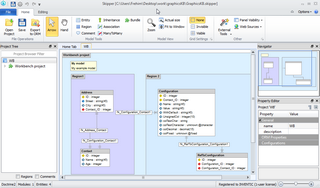
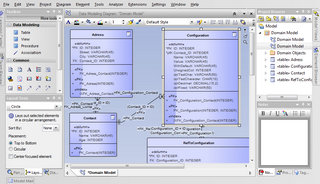
Enterprise Architect is a powerful UML diagramming tool with supporting features for resource management, model auditing and simulation. Skipper is not only an ORM modeling tool, but most importantly it is able to export changes in the model to definition files automatically. This is the most important difference and we want to bring it to the forefront.
Feature comparison
In this table we want to briefly introduce the differences between Skipper and Enterprise Architect application. More detailed description is available further in the article.
| Feature | Skipper | Enterprise Architect | |
|---|---|---|---|
| Visual Model | |||
| Visual representation | ✔ | ✔ | |
| Functional diagram elements | ✔ | ✔ | |
| Basic objects (entity/table, field/column,...) | ✔ | ✔ | |
| Advanced objects (many-to-many, inheritance,...) | ✔ | ✘ | |
| Nested diagrams | ✘ | ✔ | |
| ORM Frameworks | |||
| ORM schema files import/export | ✔ | ✘ | |
| Knowledge of ORM framework keywords | ✔ | ✘ | |
| Specific ORM features (validators, behaviors,...) | ✔ | ✘ | |
| Database | |||
| Direct access to database | ✘ | ✘ | |
| Database structure import/export | ✘ | ✘ | |
| DDL code for tables export | ✘ | ✔ | |
| Advanced Techniques | |||
| Store model in project file | ✔ | ✔ | |
| Split model to standalone modules | ✔ | ✔ | |
| Customize and extend application | ✔ | ✘ | |
| Automatic code generation | ✔ | ✔ | |
| Generated code update | ✔ | ✘ | |
Detailed comparison
In this table you can find comprehensive feature comparison between Skipper and Enterprise Architect application. As in the previous section, we will compare only the features related to ORM frameworks.
| Feature | Skipper | Enterprise Architect | |
|---|---|---|---|
| Visual Model | |||
| Representation | Visualize the ORM model and entities on the object level using extended ER diagram. | Visually represents the database structure using UML ER diagram. | |
| Data elements | project, module, entity, field, association, many-to-many, inheritance, index | table, column, index, relation, sequence, procedure | |
| Visual elements | region, comment | various UML elements | |
| ORM Frameworks | |||
| Targeting | Created as a tool to work with ORM frameworks. Therefore, all ORM major frameworks like Doctrine, Doctrine2 and Propel. | Does not support ORM frameworks, it is a design and simulation tool for UML. | |
| Supported | Doctrine, Doctrine2, Propel, CakePHP | none | |
| Formats | Schema files in XML, YML or PHP/Java annotations format. | none | |
| Schema import | Imports any Doctrine, Doctrine2 or Propel schema files. | Does not import any code. Works only with UML diagrams. | |
| Schema export | Exports schema definitions for Doctrine, Doctrine2, Propel or CakePHP framework. | Does not export schema definitions, can only export DDL code for tables. | |
| More features | Continuous development and export of the schema files. | none | |
| Database | |||
| Direct access | Not able to access or modify database. Database logic is delegated to ORM frameworks. | Not able to access or modify database. Focuses on the model only. | |
| Structure import | Database structures can be imported to Skipper through ORM framework. Application cannot import the database structure directly. | Database structures cannot be imported from database directly. Other models in XMI compliant format can be imported and PHP code can be reverse engineered. | |
| Structure editing | Database structures cannot be modified directly. This is implemented by ORM frameworks (for example by migrations). | Structures can be exported to code, but once created in database, they cannot be edited. | |
| Data editing | Skipper does not modify stored data in any way. Data are modified through entity manipulation and ORM framework. | Data cannot be modified. | |
| Project Serialization | |||
| Project file | Skipper can import MySQL Workbench file and convert it to ORM schema files (e.g. Doctrine2). | Ability to open diagram files or reverse engineer PHP code. | |
| Project format | Project is stored in well readable and easily editable XML files. | Project is stored in XMI compliant file. | |
| Advanced Techniques | |||
| Documentation | Visual model with comments can be exported as a PDF file. | Database structure can be described in multiple modeling languages. | |
| Model Viewer | You can browse complete visual model using the Free Viewer Tool. | You can browse model in tools capable of importing XMI files. | |
| Model reusability | With Skipper you can split your project to modules and share modules among several projects. | Enterprise Architect diagrams can be structured, separated and linked together. | |
| Customization | Wide range of application customizations. Templates, extendable properties, custom scripts and datatypes, external tools, etc. | Supports adding new UML templates, patterns and modeling objects using the MDG technology. | |
| Platform Support | |||
| Windows | Windows XP, Windows Vista, Windows7, Windows8 | Windows XP SP2, Windows Vista, Windows7, Windows8, Windows Server 2008, Windows Server 2003 | |
| Mac OS X | 10.6.8+, 10.7, 10.8, 10.9 | OS X 10.5.x | |
| Linux | Fedora, Ubuntu, Red Hat Linux | Linux Operating System (kernel 2.4 or later) | |
Conclusion
Enterprise Architect is a powerful tool for project planning, process modeling and simulation, and resource management. Multiple connected diagrams allow you to plan and document any process in any stage of the project development.
Skipper is a specialized tool for designing your model and creating schema definitions. You need to care only about the design of the model, visualized by Skipper using the extended ER diagram notation. Underlying database is being serviced by the ORM framework.
Enterprise Architect provides multitude of tools to plan the whole process of the development of application. However, in the development itself, only basic code structures can be generated. To cover actual development, Skipper allows import and export of the definition files, and their creating or modifying in the clear and fast visual model.